






Take Profit and Stop Loss are additional orders that can be attached to an open position or a pending order. They give an order to the broker to automatically close the position when a specific price level is reached.
- Take Profit is used to lock in profits when the price moves in the desired direction.
- Stop Loss helps limit losses if the price moves against the trader.
A trader can manually monitor their positions or use a trading robot. However, this approach has its drawbacks:
- A trader can’t always be at the computer for constant monitoring.
- While a robot solves that issue, it depends on the trader’s PC/laptop. If the system crashes or the internet connection is lost, the robot can’t manage the positions.
Take Profit and Stop Loss solve this problem. These orders are stored and executed on the broker’s server, making them independent of the trader’s platform status.
You can modify stop levels in several ways:
- Through the Modify or Delete option
- By dragging the levels on the chart
- Via the context menu on the chart of the respective instrument
To change the stop levels of a position, right-click on it in the Trade tab and select Modify or Delete Order for MT4 and Modify or Delete for MT5.
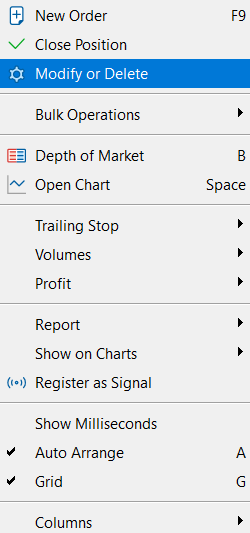
In the window that appears, you can adjust the levels in two ways:
1. By entering values directly in the Stop Loss and Take Profit fields.
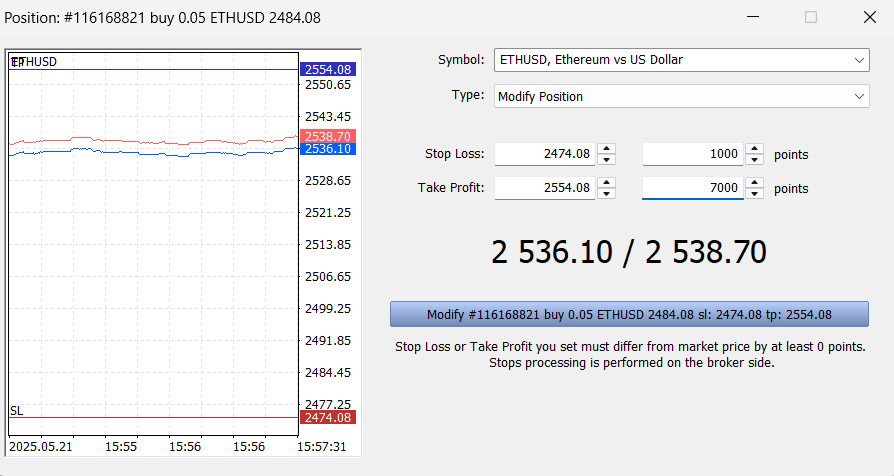
2. By specifying the number of points from the position’s opening price.
Then click the Modify button to save the changes.